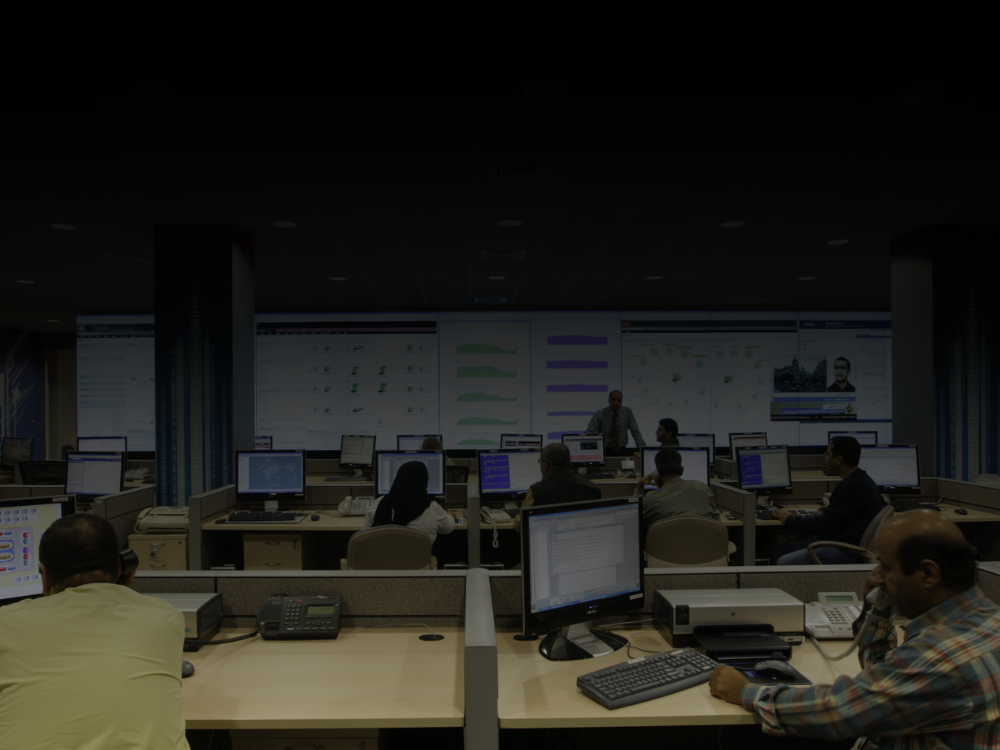
Every NOC has a version of the same problem.
The team is talented. The monitoring tools are sophisticated. The data pouring into the operations centre is comprehensive, detailed, real-time. And yet, when something goes wrong at 2 am — a network anomaly begins to cascade across a critical system — the operator on shift is hunting. They are toggling between six different dashboards on two monitors, trying to construct a mental picture of what is happening across a distributed infrastructure, from a screen setup that was not designed for this moment.
The data is all there. The problem is visibility.
A well-designed NOC video wall solution does not add more data to the room. It organises the data that already exists into a shared visual context — one that all operators see simultaneously, that highlights what matters, and that allows teams to coordinate a response without needing to describe what is on their individual screen to each other.
This distinction — between having data and having visibility — is at the heart of what separates a high-performing Network Operations Centre from one that perpetually operates in reactive mode.
Why NOCs Are Rethinking Their Display Infrastructure in 2026
Network operations centres have existed since AT&T opened the first network management facility in New York in 1962. What began with status boards and physical switches has evolved, over six decades, into sophisticated monitoring environments managing everything from enterprise IT infrastructure to satellite networks, cloud platforms, telecommunications grids, and data centre operations.
But the pace of that evolution has accelerated sharply. Modern NOCs are expected to monitor environments that span cloud and on-premise infrastructure simultaneously, detect anomalies before they escalate through AI-driven predictive analytics, and coordinate response across teams that may be geographically distributed. An hour of downtime in a large enterprise can cost between $50,000 and $1 million, depending on the industry. The pressure on NOC teams is relentless.
And yet, remarkably, many NOCs are still running their visual infrastructure the way they did in 2010: individual monitors on individual desks, a shared display that shows a static dashboard, and no unified view of the environment that the entire room can act from.
This is the gap a purpose-built NOC video wall solution closes.
Know more about → Datacenters & NOC
What a NOC Video Wall Actually Does?
The video wall in a network operations centre is the room’s shared brain. It is not for decoration, and it is not simply a larger version of an individual monitor. It serves several distinct operational functions.
Unified situational awareness. A NOC video wall aggregates feeds from monitoring tools, ticketing systems, performance dashboards, CCTV infrastructure, GIS maps, and custom analytics platforms into a single visual surface. Every operator in the room, regardless of their specific workstation role, has the same picture of the environment. When an incident escalates, the team does not need to establish what they are looking at — they already know.
Alert prioritisation and visual escalation. In most monitoring environments, alert noise is a serious operational problem. When everything looks critical, nothing gets treated as critical. A well-configured video wall gives the NOC a shared visual hierarchy: primary displays for the highest-priority data, secondary panels for monitoring streams and performance metrics, contextual areas for reference information. Alerts that exceed defined thresholds change the visual state of the wall — colour, placement, prominence — so operators respond to what matters most.
Multi-source, multi-format input management. NOC environments feed from an enormous variety of data sources — SolarWinds, Nagios, ServiceNow, custom dashboards, RTSP camera streams, streaming performance data from DCIM platforms. A NOC video wall controller must accept all of these simultaneously, route any source to any area of the display, and switch layouts rapidly as operational requirements change.
24/7 hardware reliability. A NOC that operates continuously cannot afford a video wall controller that requires planned maintenance windows, OS patch reboots, or that experiences software instability under continuous load. Hardware-native controllers — those that process signals at the hardware layer rather than running on a general-purpose operating system — are the standard for serious 24/7 NOC deployments.
DT4000 Multi-screen Controller
Layout Design Principles That Actually Work
The layout of what is displayed on a NOC video wall is as important as the hardware chosen to run it. A common mistake is attempting to display everything simultaneously — resulting in a wall that looks impressive in a demonstration but overwhelms operators in practice.
High-performing NOC layouts follow a clear hierarchy. The largest, most prominently positioned area of the wall shows the primary network health overview — the big picture. Secondary areas are assigned to specific monitoring categories: server health, network performance, application status, active incidents. A dedicated section handles active alerts sorted by priority level, updating in real time. And a contextual area accommodates reference displays — maps, capacity graphs, or a live news feed that keeps operators aware of external events that might affect the network.
The ability to switch between saved layouts quickly — a routine operations view and a high-severity incident response view, for example — is a feature that pays significant dividends during a major incident when reconfiguring the wall manually is not an option. [INTERNAL LINK: video wall management software blog]
Choosing the Right NOC Video Wall Solution
When evaluating options for a network operations centre display setup, the criteria that matter most are: hardware-native processing with no OS dependency; support for simultaneous multi-source inputs; flexible layout configuration via intuitive management software; built-in redundancy; and a vendor with actual experience in 24/7 mission-critical installations, not just corporate presentation environments.
The NOC video wall is not the most glamorous investment on a data centre’s capital expenditure list. But it is the one that the entire operations team depends on, every shift, every day. Getting it right is an investment in the team’s effectiveness — and ultimately in the infrastructure uptime the whole organisation depends on.
NOC Video Wall Solution FAQs
A NOC video wall should display a unified view of network health metrics, active alerts sorted by priority, monitoring tool feeds, performance dashboards, and any relevant CCTV or situational feeds — organised by visual hierarchy so operators can identify critical issues immediately.
For 24/7 NOC operations, hardware-native controllers with no OS dependency are strongly preferred. These offer continuous operation, instant failover, and no vulnerability to software crashes or OS-level issues during critical incidents.
The configuration depends on the size of the NOC team and the number of data sources being monitored. Most enterprise NOCs operate between 3×2 and 4×3 configurations. The key principle is that the wall should provide enough visual real estate for a unified view without becoming cognitively overwhelming.